
从源码开始并构建
本主题说明如何获取 QGroundControl 源代码并在本机或在 Vagrant 环境中构建它。 本主题还提供其他可选功能信息及特定于操作系统的功能信息。 本主题还提供其他可选功能信息及特定于操作系统的功能信息。
每日构建
如果您只是想测试 (而不是调试) 最近生成的 QGroundControl ,那么请使用Daily build。 官方提供了适用于所有平台的版本。 官方提供了适用于所有平台的版本。
源代码
Source code for QGroundControl is kept on GitHub. 它采用 Apache 2.0 和 GPLv3 双重授权。
要获取源文件, 请执行以下操作:
克隆存储库 (或您的分叉), 包括子模块:
shgit clone --recursive -j8 https://github.com/mavlink/qgroundcontrol.git2.更新子模块(每次拉新源代码时都这样做):
shgit submodule update --recursive
TIP
提示:不能使用Github以zip形式下载源文件,因为zip压缩包中不包含相应的子模块源代码。 你必须使用git工具! 你必须使用git工具!
构建QGroundControl开发环境
使用容器
我们支持使用存储库源代码树上的容器进行 Linux 构建,这可以帮助您开发和部署 QGC 应用程序,而无需在本地环境中安装任何要求。
原生构建
QGroundControl 支持macos、linux、windows 和 Android 平台的构建。 理论上可以为iOS创建一个 QGC 版本,但不再支持作为标准构建。 QGroundControl 使用 Qt作为其跨平台支持库。
所需的 Qt 版本为 6.10.1 (必须无误)。
WARNING
请勿使用任何其他版本的 Qt! QGC 已通过指定 Qt 版本(6.10.1)的全面测试。 其它的 Qt 版本很可能会注入影响稳定和安全的 bug (即使QGC 编译通过)。
更多信息请看: Qt 6 支持平台列表。
安装Qt
您必须像下面描述的那样安装Qt ,而不是使用预构建的软件包,例如Linux发行版。
如何安装Qt:
下载并运行Qt Online Installer
- Ubuntu:
- 使用以下命令将下载的文件设置为可执行文件:
chmod + x - It may also be necessary to install libxcb-cursor0.
- 使用以下命令将下载的文件设置为可执行文件:
- Ubuntu:
在 _Installation 文件夹页面选择"自定义安装"
在 选择组件 页面:
- I you don't see Qt 6.10.1 listed check the Archive checkbox and click Filter.
- Under Qt -> Qt 6.10.1 select:
- Windows: MSVC 2022 <arch> - where <arch> is the architecture of your machine
- Mac: Desktop
- Linux: Desktop gcc 64-bit
- Android: Android
- Select all Additional Libraries
- Deselect QT Design Studio
安装附加软件包(特殊平台)
- Ubuntu:
python3 ./qgroundcontrol/tools/setup/install_dependencies.py --platform debian - Fedora:
sudo dnf install speech-dispatcher SDL2-devel SDL2 systemd-devel patchelf - Arch Linux:
pacman -Sy speech-dispatcher patchelf - Mac:
python3 ./qgroundcontrol/tools/setup/install_dependencies.py --platform macos - Windows:
python3 ./qgroundcontrol/tools/setup/install_dependencies.py --platform windows - Android: Installing dependencies for android is quite involved. You are better off using Qt documentation for android setup instructions. Read Qt 6 for Android carefully to the extend. Continue with Gettting Started with Qt 6 for Android.
- Ubuntu:
Install OS-Specific Functionalities
INFO
依赖操作系统和用户安装的库的可选功能在下面链接/描述。 这些功能可以被强制启用/禁用,为qmake指定额外的值。
安装 Visual Studio (仅限Windows)
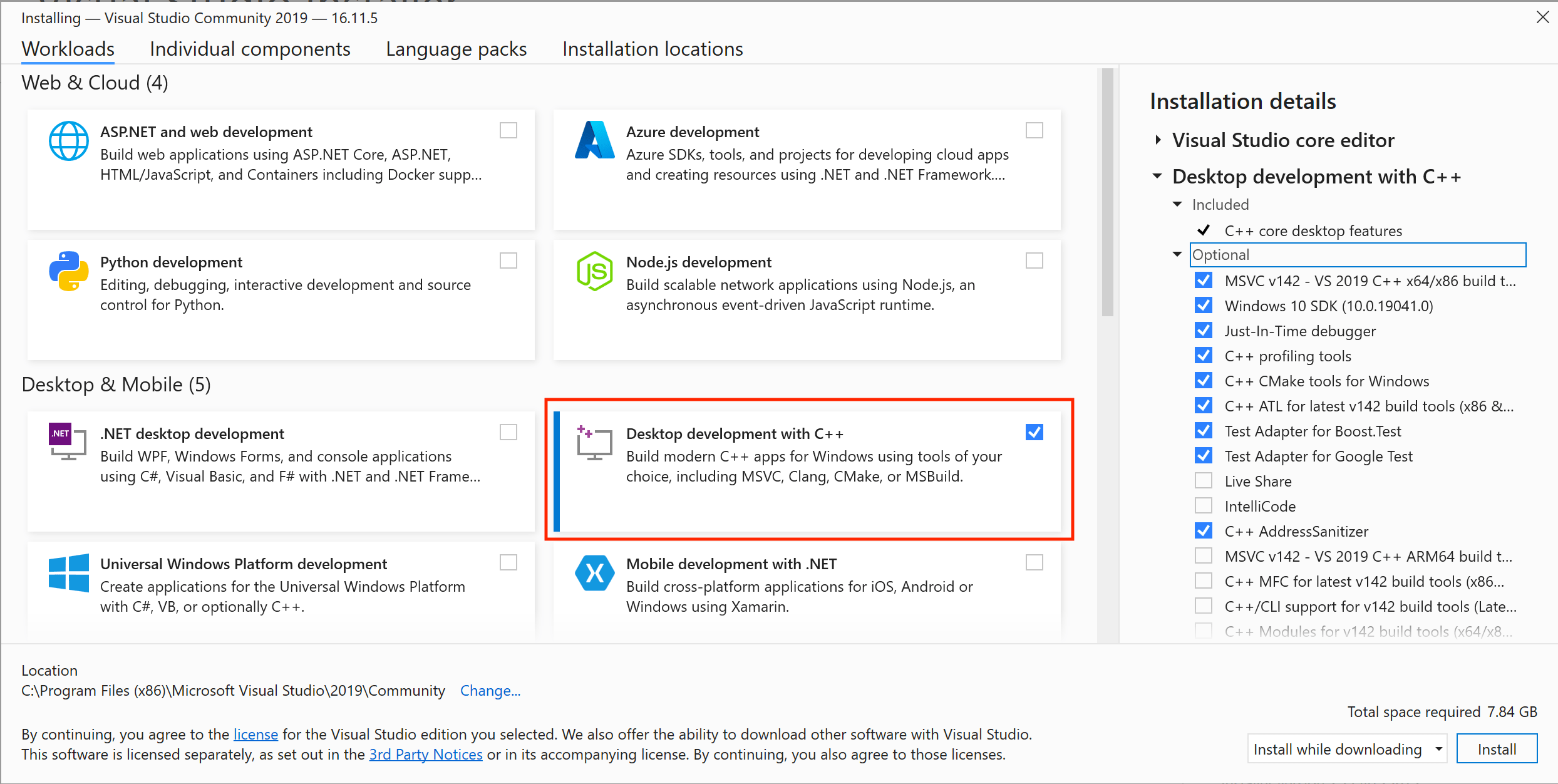
安装 Visual Studio 2022 Community Edition。
进行安装时,选择 使用 C++ 进行桌面开发 :
INFO
Visual Studio is ONLY used to get the compiler. Building QGroundControl is done using Qt Creator or cmake directly as outlined below.
使用 Qt Creator {#qt-creator} 进行构建
启动 Qt Creator,选择 Open Project 并选择 CMakeLists.txt 文件。
在 Configure Project 页面上,它应该默认您刚刚使用上面的说明安装的 Qt 版本。 如果不从列表中选择该套件,然后点击 Configure Project。
TIP
Don't forget to check boxes in case you want to build a Release instead of Debug, or check the other types. To create the installation file go to the "Deploy Settings" Tab, click in the menu button "Add Deploy Step", select "CMake Install" and as argument you must set at least
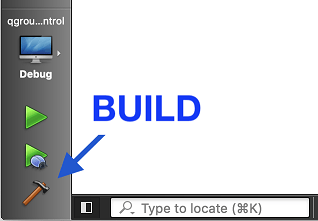
--config Release.Build using the "hammer" icon. After that, in order to deploy the build, use the "play" icon. Or use the menu Build on top for a detailed alternative.
在CLI(命令行界面)使用 CMake {#cmake} 进行构建
构建默认的 QGC 示例命令并在此后运行它:
请确保您克隆了仓库并先更新子模块,见上文 源代码 章节并切换到仓库文件夹:
shcd qgroundcontrol配置:
sh~/Qt/{{ qt_version }}/gcc_64/bin/qt-cmake -B build -G Ninja -DCMAKE_BUILD_TYPE=DebugChange the directory for
qt-cmaketo match your install location for Qt and the kit you want to use.Mac: To Sign/Notarize/Staple the QGC app bundle, add
-DQGC_MACOS_SIGN_WITH_IDENTITY=ONto the configure command line. During theinstallphase the following environment variables will need to be available:QGC_MACOS_SIGNING_IDENTITY- Signing identity for your Developer ID certificate which must be in the keychainQGC_MACOS_NOTARIZATION_USERNAME- Username for your Apple Developer AccountQGC_MACOS_NOTARIZATION_PASSWORD- App specific password for Notarization from your Apple Developer AccountQGC_MACOS_NOTARIZATION_TEAM_ID- Apple Developer Account Team ID
构建
shcmake --build build --config DebugRun the QGroundcontrol binary that was just built:
./staging/QGroundControlsh./build/Debug/QGroundControl
Vagrant
Vagrant 可以在 Linux 虚拟机内构建和运行 QGroundControl (如果兼容,也可以在主机机上运行)。
所有支持的操作系统的额外构建备注
- 并行构建: 对于非Windows构建,您可以使用 "-j#" 选项来运行并行构建。
- **如果你在运行 QGroundControll**时遇到此错误:
/usr/lib/x86_64-linux-gnu/libstdc++.so.6: version 'GLIBCXX_3.4.20' not found.,你需要更新到最新的 gcc ,或者通过使用sudo apt-get install libstdc++6安装最新的 libstdc++.6 。 - 单元测试: 若要运行 单元测试,使用
QGC_UNITEST_BUILD定义在debug模式下构建,然后复制deposition / qgroundcontrol-start。 运行测试前,将deploy/qgroundcontrol-start.sh` 脚本复制到debug目录中。
构建 QGC 安装文件
作为正常构建过程的一部分,您还可以为 QGroundControl 创建安装文件。
sh
cmake --install . --config Release